
What is Trading?
On the Roblox Platform, trading is where users can exchange limited items and Robux with other users. There are thousands of different items that can be exchanged, creating a large community of traders, looking for profit & searching for new ways to earn Robux. One of the best ways to earn Robux on the platform is, in fact, trading. This guide will teach you how to Trade on Roblox.
Can I Trade Without Premium?
Unfortunately, if you don’t have Roblox Premium, you cannot access the trading feature. However, if you subscribe to Roblox Premium, you will unlock the ability to start trading & selling limited items. Roblox Premium can be purchased for the low price of approximately $5/month, allowing it to be affordable for most people.
Premium can be acquired by following these steps:
- Go to the Premium Membership Page, this can be done by clicking “Get Premium” in the sidebar.
- Click “Get Premium”
- Choose a membership & click “Subscribe Now”
- Choose a payment method & complete your purchase.
- Once you’ve completed your purchase, you should receive ROBLOX Premium, this will include a Robux bonus & access to extra features.
How Can I Find Trades?
Trades can be found in plenty of places, you can find people to trade with in the Roblox game Trade Hangout, or you can find trades on the Rolimons website. Other options are also available, such as trading Discord servers & other trading websites.
How to Find Trades on Rolimons:
- Go to the Rolimons website, and navigate to trade ads, this can be found here.
- Search for users requesting your item. To do that, in the “Request Filters”, enter your item name/s.
- Once you’ve searched for your item/s, you can now see users offering to trade.
- Choose a person to trade with and click the “Send Trade” button.
- Fill out the trade on the Roblox website & send it.
- Wait for the user to Accept/Counter/Decline your trade.
How to Find Trades in Trade Hangout:
- Join the official Trade Hangout game on Roblox.
- Find people with similarly valued items to trade with.
- Ask them to trade.
- Send them a trade, this can be done by searching their username on Roblox. Then clicking on their profile, clicking the three dots & clicking trade. You can then enter your trade offer & send the trade.
- Now, just wait for them to Accept/Counter/Decline the trade.
How to Make Robux From Trading
Making profit from trading sounds a lot easier than it is. Whilst the overall idea is relatively simple, trade for items worth more than your own, it’s not so simple in execution. For example, when trading for items, you must watch out for “Projected Items”. You should also try to trade for high-demand items, these are items that people want, meaning they sell in large quantities & often. Also, you can trade using “Values”, which can be found, again, on the Rolimons website.
How do I Know if a Roblox Item is Projected?
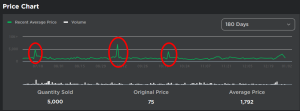
A projected item on Roblox can be identified by a spike in the Recent Sales, which can be seen below. This causes an item’s Average Price (RAP) to inflate rapidly, portraying the item as being worth a large amount more than it actually is. Avoid these items at all costs.
Can I Trade With Someone Without Premium?
Unfortunately, the answer is no. You cannot trade with another user if both parties don’t have a subscription to Roblox Premium. However, if you both do have premium, you’re good to go. If you’re trying to give an item to someone without Premium, you can always put the item on sale & have them purchase it. But, if you’re going to set a low price for the item, be careful, as there are bots scanning the website for cheap items to purchase & make profit on.